VOICE
Speech that sounds like home
Turn text into audio with approved native and international voices.
POST /speechAnnouncements · Accessibility · Customer updates
BUILT FOR YOUR NEXT INTEGRATION
Bring native voices, useful answers and face-to-face AI conversations into the systems your customers already use.
Scoped API keys · Your agents · Usage visibility
YOUR FIRST REQUESTGET /voices
curl https://locallanguagelab.com/api/v1/company/voices \
  -H "X-API-Key: $LAB_API_KEY"
Three ways to connect
Use each capability on its own, or bring them together in your application.
Turn text into audio with approved native and international voices.
POST /speechAnnouncements · Accessibility · Customer updates
Connect your business knowledge to helpful, multilingual text replies.
POST /agents/{id}/messagesHelp centres · Internal tools · Customer chat
Launch a speaking, listening video agent inside your own experience.
POST /agents/{id}/sessionsDigital reception · Guided service · Support
Inside your workspace
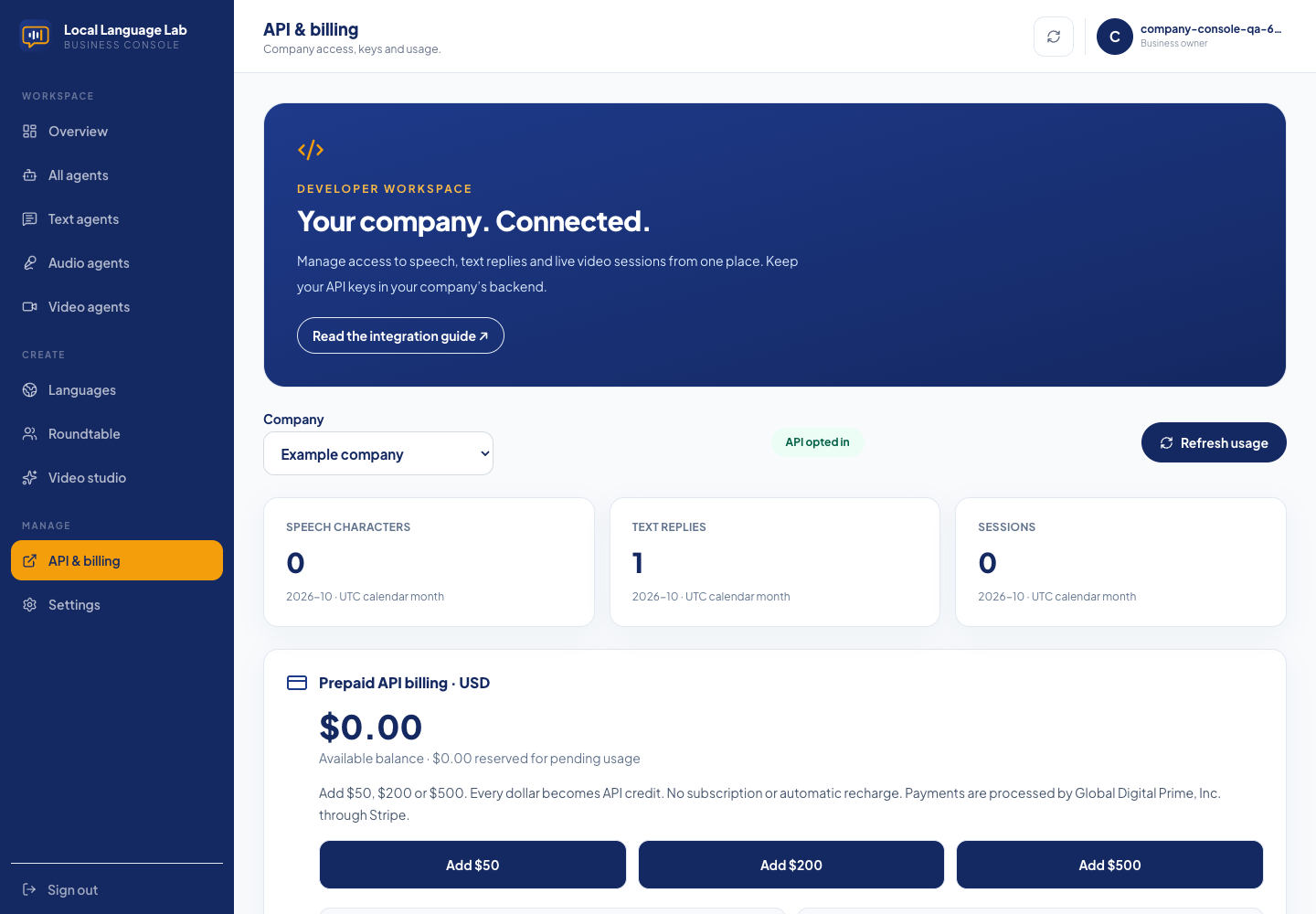
Opt in as a company, create scoped keys and choose which agents your integration can use.
Integration reference
Integrate approved voices, business-aware text replies and live video agents into your application.
Base URL: https://locallanguagelab.com/api/v1/company.
Existing operator-managed pilot allowances remain in place. Prepaid credit is available through the console using secure Stripe Checkout.
| Service | Rate |
|---|---|
| Generated speech | $1.20 / 1,000 characters |
| Standard text reply | $0.20 / successful reply |
| Live audio | $1.50 / minute |
| Live video including audio | $3.00 / minute |
Prepaid top-ups are $50, $200 and $500, dollar-for-dollar. Global Digital Prime, Inc. processes payments through Stripe. No subscription or automatic recharge. Video includes audio; the two rates are never added together. Calls are billed by the second, including connected silence, up to the grant's duration limit. Speech uses JavaScript/UTF-16 character counts after trimming, proportionally rather than rounding to the next thousand.
Funds are reserved before generation. Failed speech/text work releases its hold;
unused call funds return after server/provider usage confirmation. Video holds
can remain pending while provider usage is unavailable. Contact billing support
for unresolved holds or payment refunds. A cancelled checkout adds no credit.
/usage includes wallet.available_micro (1,000,000 micro-units = $1 USD).
The console shows balance activity and payment status. Return from checkout is
not payment confirmation: credit appears after Stripe verification.
Standard text permits 12,000 UTF-8 bytes of combined prompt/history/knowledge and 500 output tokens. Reduce conversation history or the agent brief if rejected. Standard live calls allow six response attempts per rolling minute, bounded context and 400 output tokens per reply; web search and vision are disabled. Custom training, extended context, paid tools and integration work are separate.
Download the OpenAPI specification and video integration example.
Send X-API-Key: lab_live_… from your backend. Never ship the company key in
browser/mobile code, URLs or public repositories. Keys are stored as SHA-256
hashes, expire after 90 days by default and can be independently revoked.
There is no browser CORS access to company endpoints. A company's backend
must authenticate its own users before exposing calls to them.
An account belongs to one verified Lab user. The owner selects their agents in
API & billing; operators can also configure pilot accounts. Both assignment and current ownership are checked
on each agent request. Inactive agents are unavailable. Keys may be restricted
to catalog:read, speech:write, messages:write, sessions:write, usage:read.
The existing hosted-agent/widget endpoints remain available under their existing
rules. Company quotas cover calls to /api/v1/company; hosted calls and company
calls share each agent's underlying call-duration allowance. Assignment does
not convert an already published hosted agent into a private agent.
| Method | Path | Scope | Result |
|---|---|---|---|
| GET | /voices | catalog:read | Approved speech voice IDs, names, descriptions and languages |
| GET | /agents | catalog:read | Assigned active agents and their type/language/profile IDs |
| POST | /speech | speech:write | WAV or MP3 audio bytes |
| POST | /agents/{id}/messages | messages:write | Knowledge-grounded text reply |
| POST | /agents/{id}/sessions | sessions:write | Short-lived audio/video session credentials |
| GET | /usage | usage:read | Current UTC month's admitted usage and limits |
Agent catalogue entries include image_url: the uploaded audio-agent portrait or selected video presenter image. Display this URL in your app; it is public and may change when the owner replaces the image. Hosted pages and the website widget update automatically.
Catalogue lists return { "data": [...] }, ordered and capped at 100 items in
this release. Companies requiring larger catalogues need pagination before onboarding.
Voice/profile UUIDs are platform IDs; provider asset IDs and credentials are
resolved on our server. The speech endpoint supports approved native and
ElevenLabs profiles. It does not silently switch voice providers on failure.
First call /voices and choose an ID with the required language_codes entry.
curl --fail-with-body "$LAB_API/voices" -H "X-API-Key: $LAB_API_KEY"
curl --fail-with-body "$LAB_API/speech" \
  -H "X-API-Key: $LAB_API_KEY" -H 'Content-Type: application/json' \
  -d '{"voice_id":"VOICE_UUID","language":"en","text":"Welcome. How can we help?"}' \
  -o speech.audio
Set LAB_API to the base URL above and LAB_API_KEY using your secret manager.
text is trimmed, nonempty, and at most 4,000 UTF-16 code units. Language must
be listed on the selected voice. Read Content-Type: audio/wav for native
voices, audio/mpeg for ElevenLabs. No emotion/pace overrides in this release.
Native availability is governed by the approved catalogue and deployed model;
an approved profile alone does not guarantee provider uptime.
curl --fail-with-body "$LAB_API/agents/AGENT_UUID/messages" \
  -H "X-API-Key: $LAB_API_KEY" -H 'Content-Type: application/json' \
  -d '{"messages":[{"role":"user","content":"What services do you offer?"}]}'
Response: { "agent_id": "…", "reply": "…" }.
Send 1–20 messages with user or assistant roles, each at most 4,000 characters.
The final message must be from the user; the last 12 messages form the model
context. Store conversation history in your own system and resend it each turn.
Business instructions, language and approved knowledge come from the assigned
Lab agent. API callers cannot supply system prompts or another business's agent
key. Text replies work with assigned text, audio and video agents.
The existing text engine also limits each company/agent pair to 30 replies per
10 minutes. Knowledge or model failures return an error rather than a fabricated
successful reply.
curl --fail-with-body "$LAB_API/agents/AGENT_UUID/sessions" \
  -H "X-API-Key: $LAB_API_KEY" -H 'Content-Type: application/json' \
  -d '{"mode":"video","transcript_consent":false}'
mode is audio or video. Text-only agents cannot open calls. Video requires
an approved, active Anam profile on a video-enabled agent. Transcript consent is
an explicit boolean; obtain the person's consent before setting it to true.
This value is returned in the gateway start message: your integration must send
it accurately. The gateway's existing transcript retention rules apply.
201 response shape:
{
  "agent_id": "…",
  "mode": "video",
  "expires_in": 60,
  "max_duration_seconds": 120,
  "audio": {
    "url": "wss://pwd-native-tts.fly.dev/call",
    "start": { "type": "start", "grant": "…", "transcript_consent": false },
    "input_format": { "encoding": "pcm_s16le", "sample_rate": 24000, "channels": 1 }
  },
  "video": {
    "credential": "lab.…local",
    "engine_path": "/api/anam-session/v1/engine/session"
  }
}
The duration shown is illustrative; the server returns the actual reserved
maximum. video is null in audio mode. Credentials must be started within
60 seconds of issuance. Audio and avatar admission each consume their part of
the same single-use grant. Do not automatically retry session creation or
avatar engine startup: a timeout can occur after work has started.
Live video needs both transports: our WebSocket supplies agent speech and the Anam SDK renders the avatar speaking that audio. Merely starting the avatar does not connect it to the agent's brain or microphone.
/sessions, then returns only that session response to
the authenticated end user's browser. Treat its credentials as bearer secrets.@anam-ai/js-sdk using the local credential and a
same-origin backend engine proxy, as shown below. The proxy forwards
POST to the fixed Lab engine_path, forwarding the local Authorization
header and bounded request body. Return the status/JSON unchanged with
Cache-Control: no-store. Do not accept arbitrary target URLs or forward
your company's long-lived key to the browser. Authenticate the user and
rate-limit this proxy; disable automatic POST retries.const avatar = createClient(session.video.credential, {
disableInputAudio: true,
api: {
baseUrl: `${window.location.origin}/lab-avatar`,
apiVersion: "/v1",
retry: { maxAttempts: 1 },
},
metrics: { disableClientMetrics: true },
});
// Your backend's POST /lab-avatar/v1/engine/session forwards to Lab's fixed
// /api/anam-session/v1/engine/session endpoint using the local Authorization.
await avatar.streamToVideoElement("avatar-video");
JSON.stringify(session.audio.start)
on open. Send microphone frames as { "type":"audio", "data":"BASE64_PCM" }:
signed 16-bit little-endian, mono, resampled to 24 kHz. About 100 ms per frame
matches the hosted client. Base64 encodes PCM bytes, not a WAV header.audio messages contain base64 WAV, not raw PCM. In audio mode,
queue and play those WAVs. In video mode, decode the WAV and convert to PCM16,
preserving its actual sample rate. Use
avatar.createAgentAudioInputStream({ encoding:"pcm_s16le", sampleRate, channels:1 }),
send base64 PCM chunks with sendAudioChunk, then call endSequence().
Recreate the audio input stream if the source sample rate changes.barge, clear queued playback and call avatar.interruptPersona().
phase values include thinking and listening. On error, limit, socket
closure, navigation or user hangup, stop microphone tracks, close the socket
and call avatar.stopStreaming(). Server metering/reconciliation is authoritative.The reference integration uses @anam-ai/js-sdk 4.20.0. Download the browser transport and WAV decoder, and follow the example setup. Validate your SDK version during integration.
/usage reports admitted
attempts plus available wallet funds; the billing console shows money activity.no-store and contain X-Request-Id. Error bodies are
{ "error": { "code": "…", "message": "…" }, "request_id": "…" }.Retry-After: 60. Other 429s require checking the
error code and allowance/call state. GET retries are safe. POSTs do not yet
have an idempotency-key contract; retries may generate and charge new work. Do not retry a successful POST.